
Wizard of Oz at Sphere seating map: sections explained
This booking-screen example was supplied on 25 September 2026. Use it to understand the section layout, then check the current map for your selected performance.
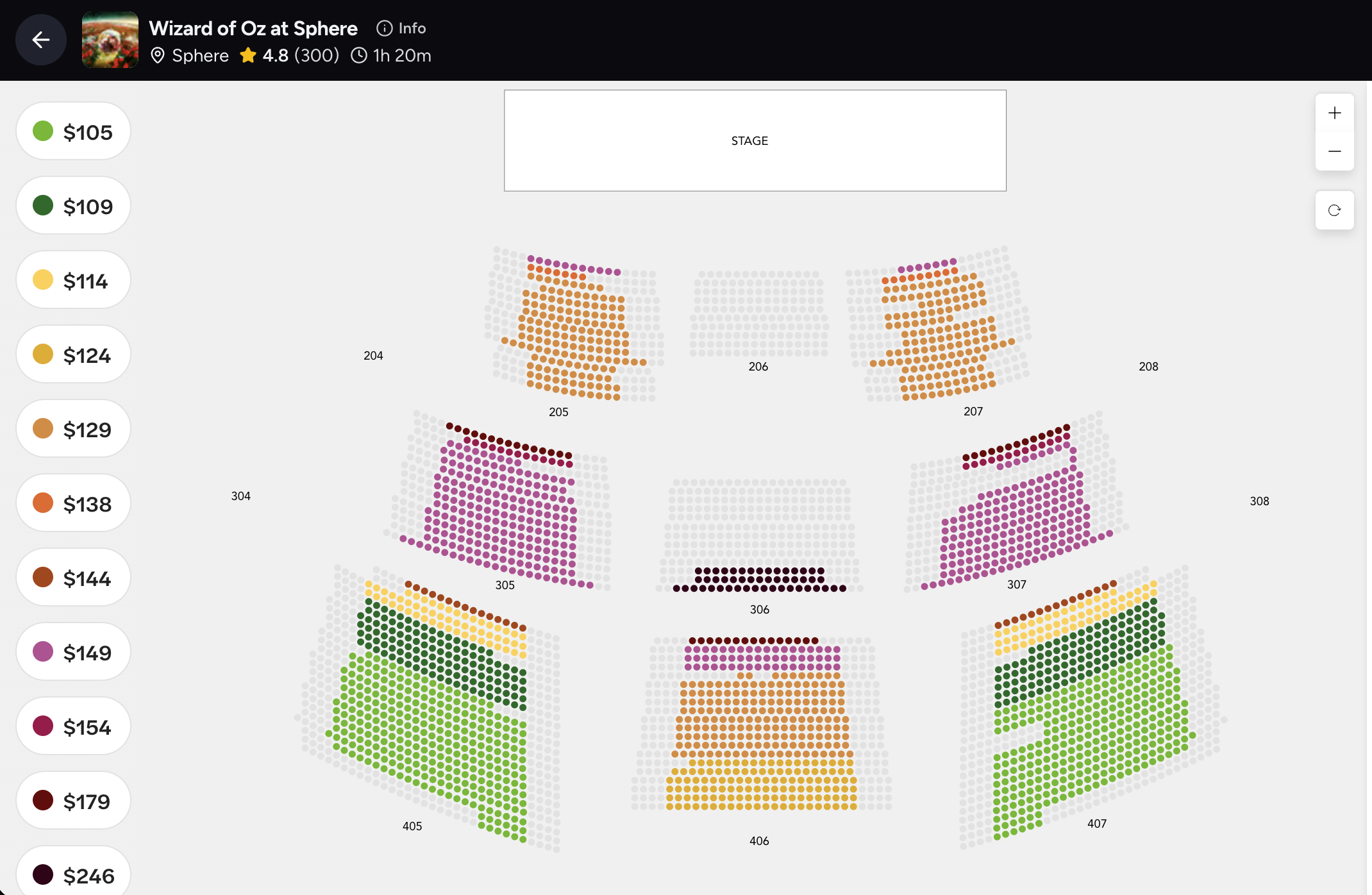
Example only: the prices, colours and available seats are not live offers. The screenshot does not identify its performance date or currency. Its “1h 20m” header differs from the venue’s current guidance of approximately 75 minutes.
| Visible sections | What the map shows | How to compare |
|---|---|---|
| 206, 306, 406 | The middle blocks in the displayed 200, 300 and 400 levels. | Start here if a central position is your priority. Compare the exact row, view notice and price; central does not guarantee an unobstructed view. |
| 205 / 207, 305 / 307, 405 / 407 | Blocks on either side of the centre at each displayed level. | Check these against a central offer if the total is lower. Judge the actual seat position, not the colour alone. |
| Individual coloured dots | A price-band illustration from one booking screen. | A section can contain several price bands. Confirm the currency, selected seats and fees on the live booking page. |
| Grey dots and missing areas | The screenshot supplies no explanation for grey seats and does not show every venue section. | Do not infer sell-outs, accessible seats or missing inventory from this static example. |
Where should you start on the Sphere seat map?
For a centre-first shortlist, compare 206, 306 and 406 in the supplied map, then look at their neighbouring blocks. That is a map-reading approach, not a tested ranking of seat views. The map does not establish the steepness of a tier, ceiling visibility, an overhang or how a specific row feels during the film.
Is section 306 better than 206 or 406?
The screenshot alone cannot answer that. It places all three on the centre line at different levels, but does not provide a seat-view photograph or view-restriction notes. Compare the actual row, access requirements and price for your session before paying more for a central section. Ask the seller to clarify any restriction that is not explained.
How to compare central and side-section value
Take one central offer and one neighbouring offer for the same session and party size. Record the section, row if available, total price and any view note. If the central option costs more, decide whether the position matters enough to your party. Do not use a cheaper coloured dot from a different row as proof that an entire section is cheaper.
Seat colour is a price band, not a VIP benefit
The example legend associates colours with prices. It does not establish lounge entry, vouchers or other package inclusions. Multiple colours appear within individual sections. A premium position and a premium package are separate things, so read the named inclusions as well as the seat number.
Accessible and non-haptic seating
A grey dot is not an accessibility symbol in this screenshot. For wheelchair spaces, companion seats, step-free access or a requirement to avoid seat movement, arrange the appropriate option with Sphere before buying. Do not expect a standard seat purchase to be exchangeable later.
What the booking screenshot cannot confirm
The image is a partial map supplied on 25 September 2026, not a live availability feed. Its session date, currency and any additional fees are not identified. Its runtime header is also older than the current venue guidance. Use the image for orientation and the live booking flow for your actual purchase.
Your final seat-selection checklist
Check Wizard of Oz as the event, the local date and time, party size, seat category or exact section and row, view restrictions, whether seats are together, the currency and final total. Then read the delivery and cancellation conditions. Save the booking confirmation and retrieve the admission tickets according to its instructions.
Read the individual experience guides
Sources and booking details
Our recommendations compare the experience and practical fit. Check current operator information and the selected ticket or tour before booking.